L1/L2 MSP HELPDESK ENGINEER
> Active Directory & Help Desk Operations
infini-cloud.local // INF-DC01
A structured helpdesk portfolio built around a simulated MSP environment, showcasing Active Directory user lifecycle management, PowerShell automation on Windows Server, and RCA/STAR style ticket documentation for L1/L2 support workflows. Created to demonstrate hands-on technical skills, structured troubleshooting, and support best practices in an enterprise style environment.
AD TASKS
5
Documented
TICKETS
5
INF-1001–1005
SCRIPTS
4
PowerShell
SCOPE
L1/L2
MSP Helpdesk
[ AD TASK COVERAGE ]
| Task | Ticket | Status |
|---|---|---|
| User Creation | INF-1003 | DONE |
| Account Unlock | INF-1001 | DONE |
| Password Reset | INF-1002 | DONE |
| Group Membership | INF-1004 | DONE |
| Domain Join | INF-1005 | DONE |
[ SCRIPT COVERAGE ]
| Script | Language | Status |
|---|---|---|
| collect-system-info.ps1 | PowerShell | READY |
| check-user-status.ps1 | PowerShell | READY |
| service-check.ps1 | PowerShell | READY |
| backup-profile.ps1 | PowerShell | READY |
[ TICKET QUEUE ]
INF-1001AD Account Lockout — Smith, John via INF-IT-001RESOLVED
INF-1002Password Reset — Smith, Jane via INF-HR-001RESOLVED
INF-1003New User Onboarding — Cruz, Maria [Finance]RESOLVED
INF-1004Access Request — Reyes, Carlos [HR_Share]RESOLVED
INF-1005Workstation Domain Join — INF-HR-002RESOLVED
[ Lab Environment ]
infini-cloud home lab — simulated MSP client on Windows Server 2025
[ DOMAIN CONTROLLER ]
| Hostname | INF-DC01 |
| Domain | infini-cloud.local |
| OS | Windows Server 2025 |
| Services | AD DS, DNS, DHCP |
| IP | Static — internal LAN |
[ INFRASTRUCTURE ]
| Hypervisor | VirtualBox / VMware |
| Network | Internal — isolated |
| Snapshots | Before major changes |
| Scripting | PowerShell 5.1 |
| Script Host | INF-DC01 |
[ WORKSTATIONS ]
| Machine | Department | OS | Status |
|---|---|---|---|
| INF-IT-001 | IT | Windows 11 Pro | JOINED |
| INF-HR-001 | HR | Windows 11 Pro | JOINED |
| INF-HR-002 | HR | Windows 11 Pro | JOINED |
| INF-FIN-001 | Finance | Windows 11 Pro | JOINED |
[ OU STRUCTURE ]
infini-cloud.local
├── Users
├── Computers
├── Servers
├── Groups
├── Departments
│ ├── HR
│ ├── IT
│ ├── Finance
│ └── Operations
├── Admin Accounts
└── Service Accounts
├── Users
├── Computers
├── Servers
├── Groups
├── Departments
│ ├── HR
│ ├── IT
│ ├── Finance
│ └── Operations
├── Admin Accounts
└── Service Accounts
[ TOOLS INSTALLED ]
| ADUC | User & computer management |
| GPMC | GPO review (read-only) |
| DNS Manager | DNS verification |
| Event Viewer | Log review & lockout audit |
| PowerShell 5.1 | Helpdesk scripting |
| PowerShell ISE | Script writing & testing |
[ SCRIPTS INDEX ]
| Script | Purpose | Usage |
|---|---|---|
| collect-system-info.ps1 | Full system snapshot for triage | .\collect-system-info.ps1 |
| check-user-status.ps1 | AD user account status and lock check | .\check-user-status.ps1 -Username Administrator |
| service-check.ps1 | Windows service health monitoring | .\service-check.ps1 [-Services "dns","netlogon"] |
| backup-profile.ps1 | Timestamped user profile archive (.zip) | .\backup-profile.ps1 -Username Administrator |
[ REQUIREMENTS ]
| PowerShell | 5.1 (built into Windows Server 2025) |
| AD Module | Required for check-user-status.ps1 — installed via RSAT on INF-DC01 |
| Execution Policy | Set-ExecutionPolicy RemoteSigned may be needed |
| Permissions | Standard helpdesk AD read access — no domain admin required |
[ NAMING CONVENTION ]
| Item | Format | Example |
|---|---|---|
| Username | firstname + first of lastname | johns, janeds, mariac |
| Workstation | INF-DEPT-### | INF-HR-001 |
| Security Group | SG-Dept-Purpose | SG-HR-SharedFolder |
| Script | action-purpose.ps1 | collect-system-info.ps1 |
| Ticket | INF-#### Category | INF-1001 |
[ USAGE EXAMPLES ]
# Collect full system info (no arguments)
.\collect-system-info.ps1
# Check AD account status
.\check-user-status.ps1 -Username Administrator
# Check default DC-critical services
.\service-check.ps1
# Check specific services
.\service-check.ps1 -Services "dns","dhcpserver","netlogon"
# Backup user profile to default location
.\backup-profile.ps1 -Username Administrator
# Backup to a specific path
.\backup-profile.ps1 -Username Administrator -BackupRoot "D:\Backups\Profiles"
.\collect-system-info.ps1
# Check AD account status
.\check-user-status.ps1 -Username Administrator
# Check default DC-critical services
.\service-check.ps1
# Check specific services
.\service-check.ps1 -Services "dns","dhcpserver","netlogon"
# Backup user profile to default location
.\backup-profile.ps1 -Username Administrator
# Backup to a specific path
.\backup-profile.ps1 -Username Administrator -BackupRoot "D:\Backups\Profiles"
[ Active Directory Workflows ]
Step-by-step L1/L2 task walkthroughs — infini-cloud.local
[ 01 ] USER CREATION INF-1003
FinanceCruz, Mariamariacmariac@infini-cloud.com
01.
Open ADUC on INF-DC01
Start → Windows Administrative Tools → Active Directory Users and Computers
02.
Navigate to correct OU
Expand infini-cloud.local → Departments → Finance
03.
Create new user
Right-click Finance OU → New → User. First: Maria, Last: Cruz, Full: Cruz Maria, Logon: mariac
04.
Set initial password
Temp password per GPO - Password Policy. Check "User must change password at next logon"
05.
Assign Security Group
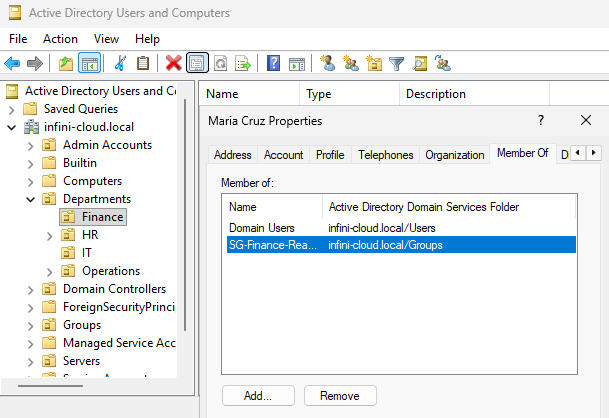
Properties → Member Of → Add → SG-Finance-ReadOnly → Check Names → OK
06.
Verify & screenshot
Confirm account in Finance OU and group listed under Member Of.
📷 ad-user-creation.png — Cruz, Maria: Member Of tab confirming SG-Finance-ReadOnly assigned in Finance OU
[ 02 ] ACCOUNT UNLOCK INF-1001
ITSmith, JohnINF-IT-001
01.
Verify lockout in ADUC
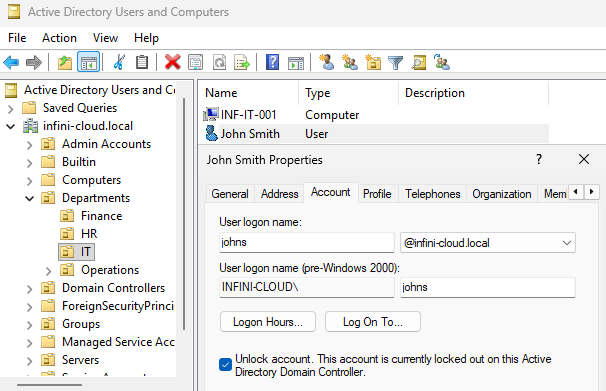
Find johns → Properties → Account tab → confirm "Unlock account" checkbox
02.
Unlock the account
Tick "Unlock account" → Apply → OK
03.
Confirm with user & screenshot
Ask user to retry login on INF-IT-001. Confirm success.
📷 account-unlock.png — Johns in ADUC Account tab with "Unlock account" checkbox visible, confirming lockout state
⚠ Account re-locks within 1 hour → escalate to L2. Indicates cached credentials or compromised session.
[ 03 ] PASSWORD RESET INF-1002
HRSmith, Janejaneds
01.
Verify identity
Confirm full name, department, and manager name before proceeding
02.
Reset password in ADUC
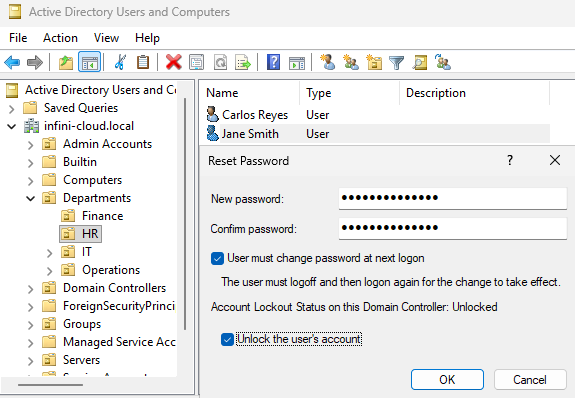
Right-click janeds → Reset Password. Min 10 chars, mixed complexity. Tick "must change at next logon"
03.
Deliver & confirm
Provide temp password via phone only — never email. Confirm user logs in and changes password.
📷 password-reset.png — Reset Password dialog for janeds: "User must change password at next logon" checked, account unlocked
[ 04 ] GROUP MEMBERSHIP INF-1004
HRReyes, CarlosSG-HR-SharedFolder
01.
Confirm manager approval
Verify written approval is attached to the ticket — no exceptions
02.
Add to Security Group
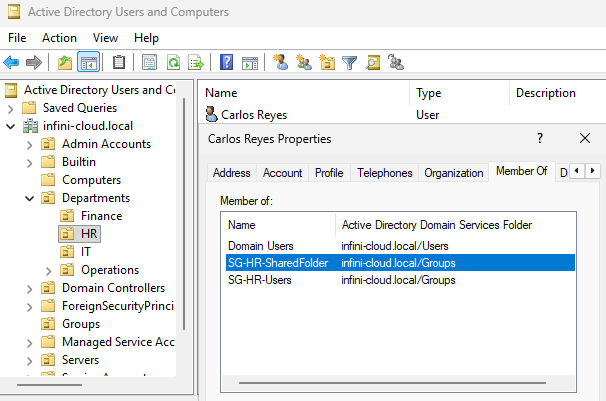
ADUC → carlosr → Properties → Member Of → Add → SG-HR-SharedFolder → OK → Apply
03.
Verify access & screenshot
User tests \\INF-DC01\HR_Share. Confirm access, log approval in ticket.
📷 group-membership.png — Carlos Reyes Member Of tab showing SG-HR-SharedFolder and SG-HR-Users in infini-cloud/Groups
[ 05 ] DOMAIN JOIN INF-1005
HRINF-HR-002Windows 11 Pro
01.
Set hostname
Right-click This PC → Properties → Rename → INF-HR-002 → restart
02.
Verify DNS
cmd → nslookup infini-cloud.local — must resolve to INF-DC01's IP. Set DNS manually if not.
03.
Join the domain
Control Panel → System → Change Settings → Change → Domain: infini-cloud.local → enter credentials
04.
Verify in ADUC & screenshot
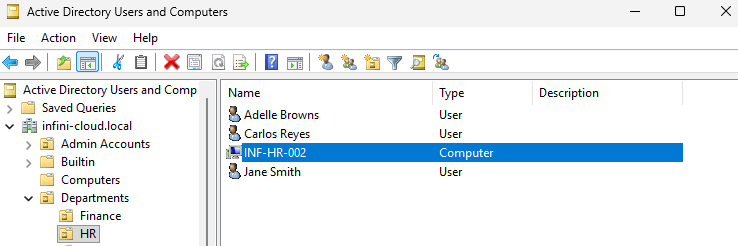
Confirm INF-HR-002 in Computers OU. Move to Departments → HR.
📷 domain-join-success.png — ADUC HR OU showing INF-HR-002 computer object successfully placed alongside HR department users
[ Ticket Examples ]
INF-1001 to INF-1005 — RCA + STAR documentation standard
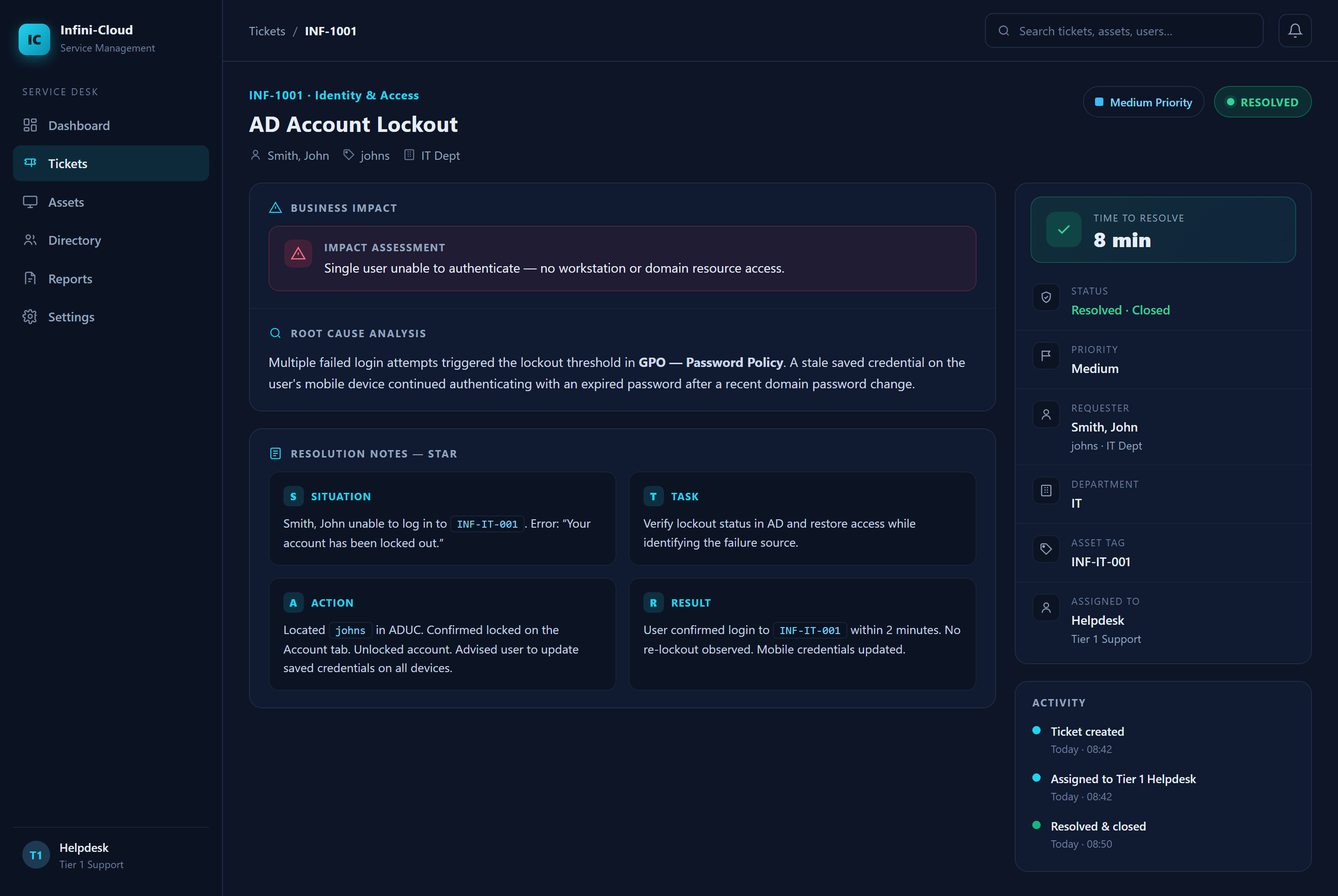
INF-1001RESOLVED
AD Account Lockout
MEDIUM
| User | Smith, John (johns) — INF-IT-001 — IT Dept |
| Business Impact | Single user unable to authenticate — no workstation or domain resource access |
| Time to Resolve | 8 minutes |
ROOT CAUSE ANALYSIS
Multiple failed login attempts triggered the lockout threshold in GPO - Password Policy. A stale saved credential on the user's mobile device continued authenticating with an expired password after a recent domain password change.
SITUATION
Smith, John unable to log in to INF-IT-001. Error: "Your account has been locked out."
TASK
Verify lockout status in AD and restore access while identifying the failure source.
ACTION
Located johns in ADUC. Confirmed locked on Account tab. Unlocked account. Advised user to update saved credentials on all devices.
RESULT
User confirmed login to INF-IT-001 within 2 minutes. No re-lockout observed. Mobile credentials updated.
📷 incident-example-1.png — INF-1001: Full resolved ticket with RCA + STAR documentation visible
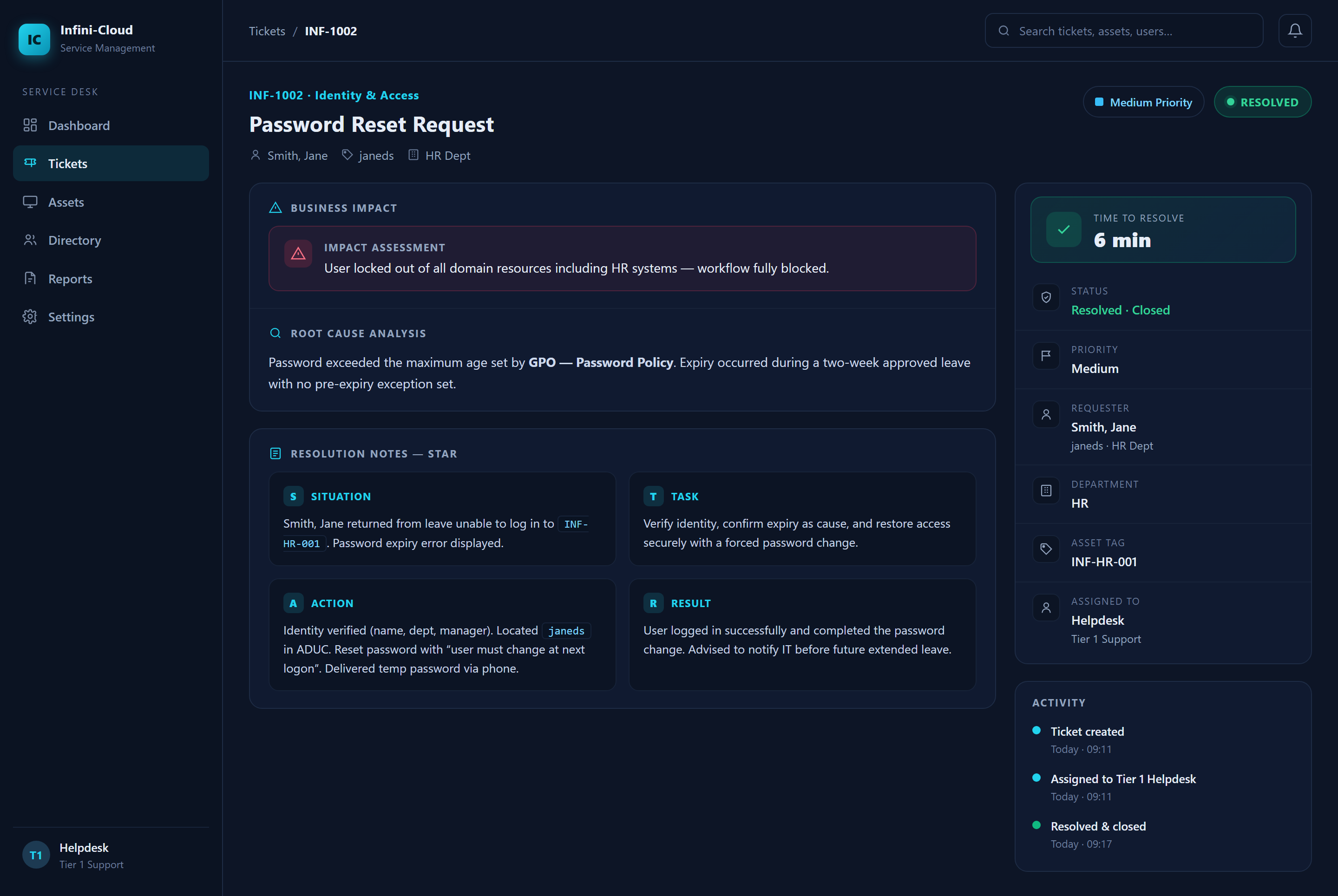
INF-1002RESOLVED
Password Reset Request
MEDIUM
| User | Smith, Jane (janeds) — INF-HR-001 — HR Dept |
| Business Impact | User locked out of all domain resources including HR systems — workflow fully blocked |
| Time to Resolve | 6 minutes |
ROOT CAUSE ANALYSIS
Password exceeded maximum age set by GPO - Password Policy. Expiry occurred during a two-week approved leave with no pre-expiry exception set.
SITUATION
Smith, Jane returned from leave unable to log in to INF-HR-001. Password expiry error displayed.
TASK
Verify identity, confirm expiry as cause, and restore access securely with forced password change.
ACTION
Identity verified (name, dept, manager). Located janeds in ADUC. Reset password with "must change at next logon". Delivered temp password via phone.
RESULT
User logged in successfully and completed password change. Advised to notify IT before future extended leave.
📷 incident-example-2.png — INF-1002: Password Reset resolved ticket with RCA + STAR documentation visible
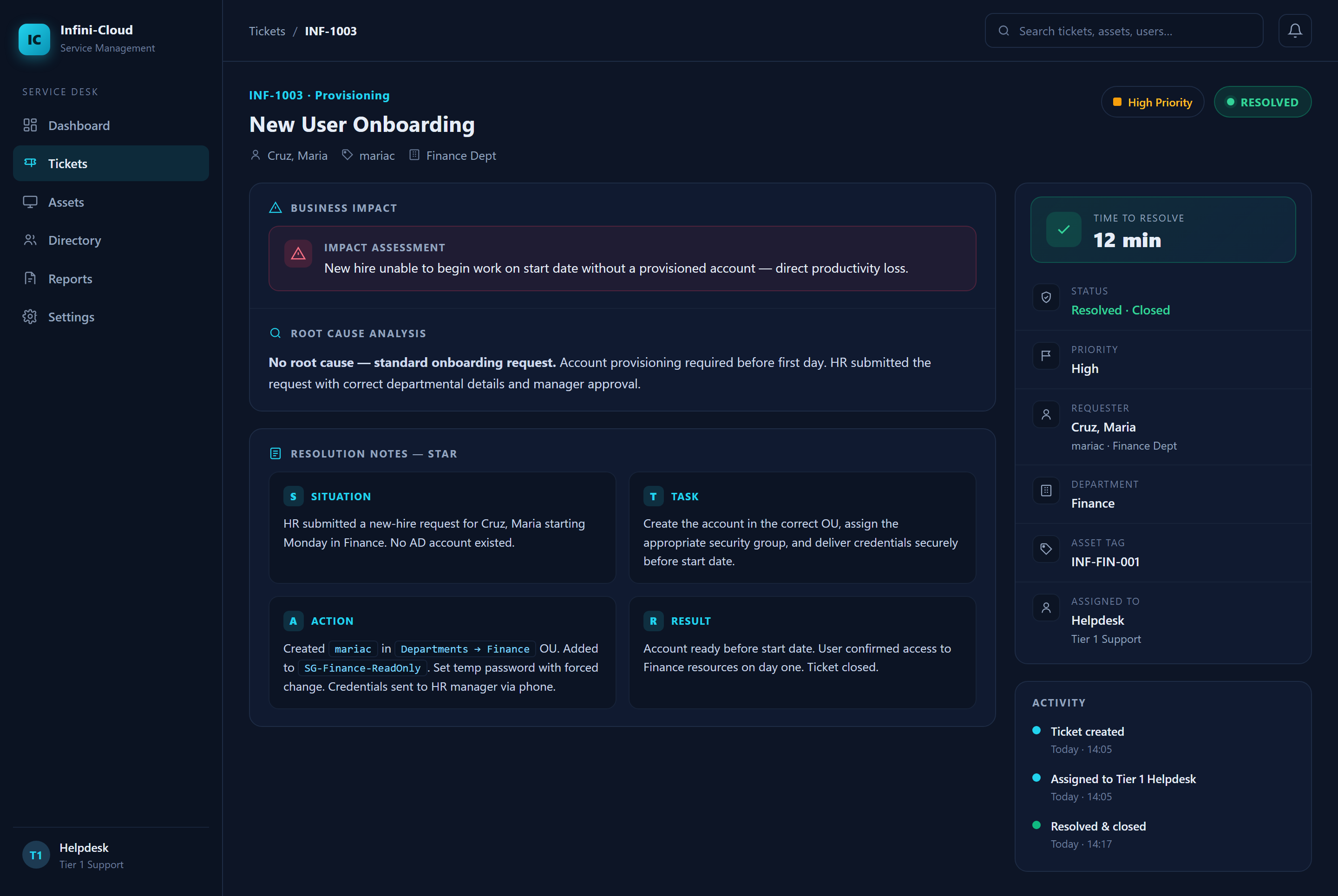
INF-1003RESOLVED
New User Onboarding
HIGH
| User | Cruz, Maria (mariac) — INF-FIN-001 — Finance Dept |
| Business Impact | New hire unable to begin work on start date without a provisioned account — direct productivity loss |
| Time to Resolve | 12 minutes |
ROOT CAUSE ANALYSIS
No root cause — standard onboarding request. Account provisioning was required before the user's first day. HR submitted the request with correct departmental details and manager approval.
SITUATION
HR submitted a new hire request for Cruz, Maria starting Monday in Finance. No AD account existed.
TASK
Create account in the correct OU, assign appropriate security group, and deliver credentials securely before start date.
ACTION
Created mariac in Departments → Finance OU. Added to SG-Finance-ReadOnly. Set temp password with forced change. Credentials sent to HR manager via phone.
RESULT
Account ready before start date. User confirmed access to Finance resources on day one. Ticket closed.
📷 incident-example-3.png — INF-1003: New User Onboarding resolved ticket with RCA + STAR documentation visible
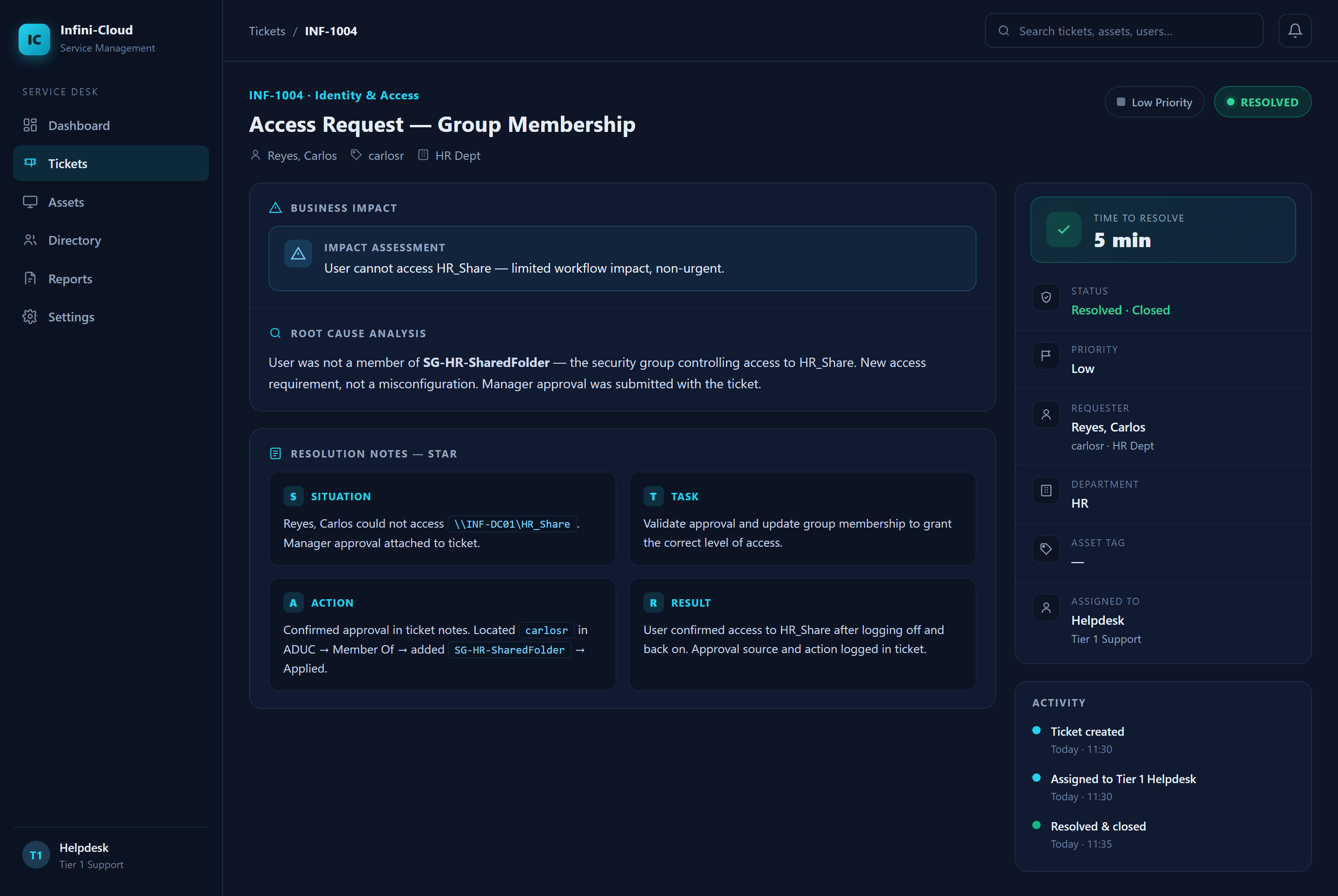
INF-1004RESOLVED
Access Request — Group Membership
LOW
| User | Reyes, Carlos (carlosr) — HR Dept |
| Business Impact | User cannot access HR_Share — limited workflow impact, non-urgent |
| Time to Resolve | 5 minutes |
ROOT CAUSE ANALYSIS
User was not a member of SG-HR-SharedFolder — the security group controlling access to HR_Share. This was a new access requirement, not a misconfiguration. Manager approval was submitted with the ticket.
SITUATION
Reyes, Carlos could not access \\INF-DC01\HR_Share. Manager approval attached to ticket.
TASK
Validate approval and update group membership to grant the correct level of access.
ACTION
Confirmed approval in ticket notes. Located carlosr in ADUC → Member Of → Added SG-HR-SharedFolder → Applied.
RESULT
User confirmed access to HR_Share after logging off and back on. Approval source and action logged in ticket.
📷 incident-example-4.png — INF-1004: Access Request resolved ticket with RCA + STAR documentation visible
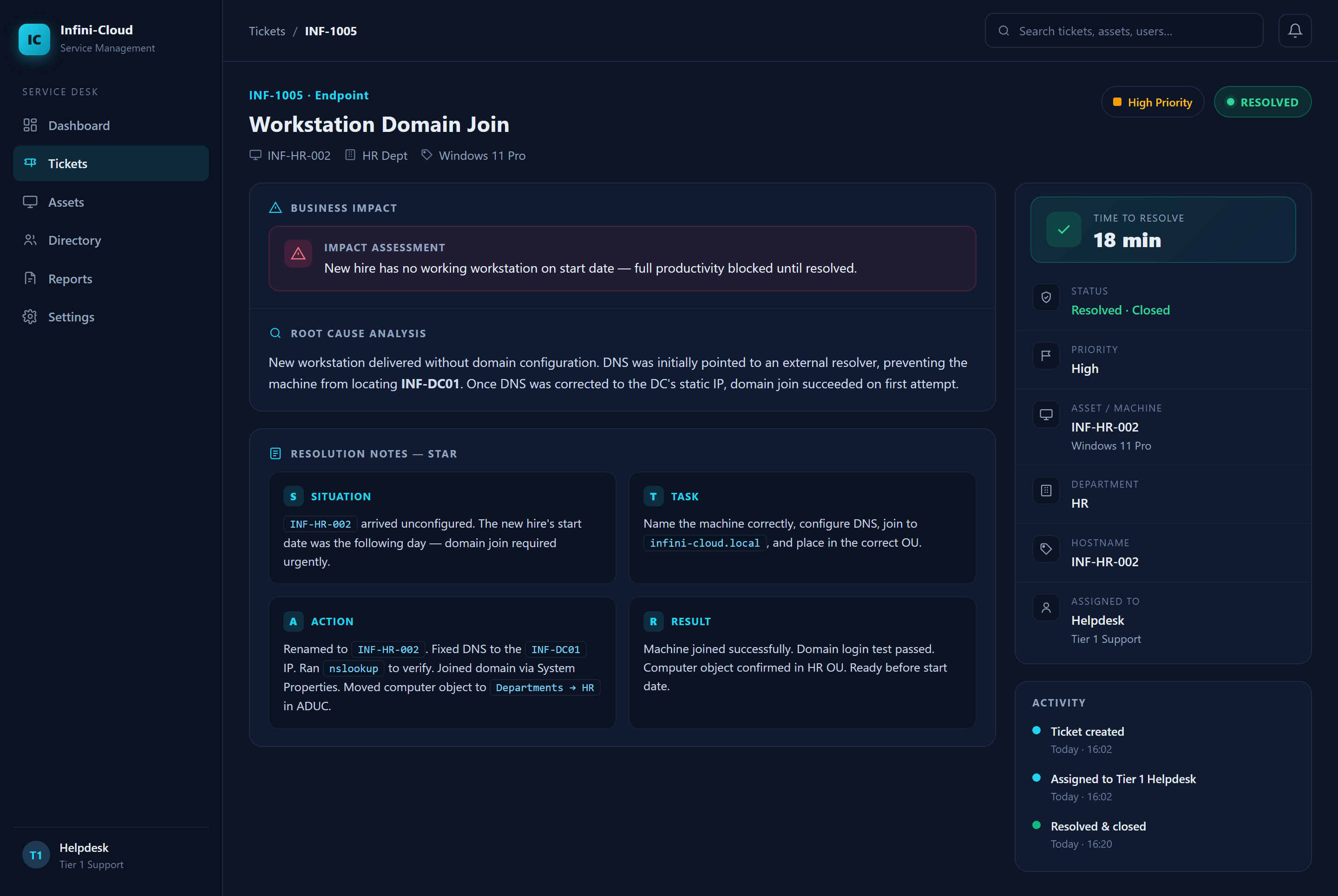
INF-1005RESOLVED
Workstation Domain Join
HIGH
| Machine | INF-HR-002 — HR Dept — Windows 11 Pro |
| Business Impact | New hire has no working workstation on start date — full productivity blocked until resolved |
| Time to Resolve | 18 minutes |
ROOT CAUSE ANALYSIS
New workstation delivered without domain configuration. DNS was initially pointed to an external resolver, preventing the machine from locating INF-DC01. Once DNS was corrected to the DC's static IP, domain join succeeded on first attempt.
SITUATION
INF-HR-002 arrived unformatted. New hire's start date was the following day — domain join required urgently.
TASK
Name the machine correctly, configure DNS, join to infini-cloud.local, and place in the correct OU.
ACTION
Renamed to INF-HR-002. Fixed DNS to INF-DC01 IP. Ran nslookup to verify. Joined domain via System Properties. Moved computer object to Departments → HR in ADUC.
RESULT
Machine joined successfully. Domain login test passed. Computer object confirmed in HR OU. Ready before start date.
📷 incident-example-5.png — INF-1005: Workstation Domain Join resolved ticket with RCA + STAR documentation visible
[ Escalation Guidelines ]
L1 → L2 → L3 triggers and handoff procedure
L1 — First Line
Password resets, account unlocks, group membership, basic triage. Handles full INF-1001 to INF-1005 scope independently.
L2 — Senior Helpdesk
AD configuration, domain issues, repeated lockouts, PowerShell-level diagnosis. Receives escalations from L1.
L3 — Sysadmin
Server changes, GPO edits, schema, infrastructure. Contact via L2 only — L1 never contacts L3 directly.
[ L1 → L2 ESCALATION TRIGGERS ]
!
Account re-locks within 1 hour (3+ times)
Indicates cached credentials or compromised session — beyond L1 scope
!
Password reset fails to resolve login after 2 attempts
Escalate immediately — may be account corruption or policy conflict
!
Domain join fails after standard checklist steps
DNS verified, credentials correct — still fails. L2 required.
!
3 or more users affected simultaneously
Infrastructure-level issue — escalate immediately, do not attempt individual fixes
!
Any GPO review or modification needed
L1 does not touch Group Policy — escalate
!
Any service account (svc-*) involved
Service account changes are L2/L3 scope only
[ ESCALATION HANDOFF TEMPLATE ]
# Fill every field — incomplete handoffs delay resolution
Ticket ID : INF-[NUMBER]
User : Lastname, Firstname (username) -- WORKSTATION
Issue : [What the user reported]
Steps Taken : [Everything L1 already tried]
Current State: [Exact state of the system right now]
Urgency : [Low / Medium / High]
Ticket ID : INF-[NUMBER]
User : Lastname, Firstname (username) -- WORKSTATION
Issue : [What the user reported]
Steps Taken : [Everything L1 already tried]
Current State: [Exact state of the system right now]
Urgency : [Low / Medium / High]
[ OUT OF SCOPE FOR L1/L2 ]
Modify GPOsCreate service accountsDomain admin accessSchema changesDelete computer objects without L2 approvalModify DNS / DHCP recordsChange OU structure
[ PowerShell Scripts ]
PowerShell 5.1 — Windows Server 2025 (INF-DC01) — L1/L2 helpdesk scope
collect-system-info.ps1
check-user-status.ps1
service-check.ps1
backup-profile.ps1
PowerShellNo args requiredRead-only
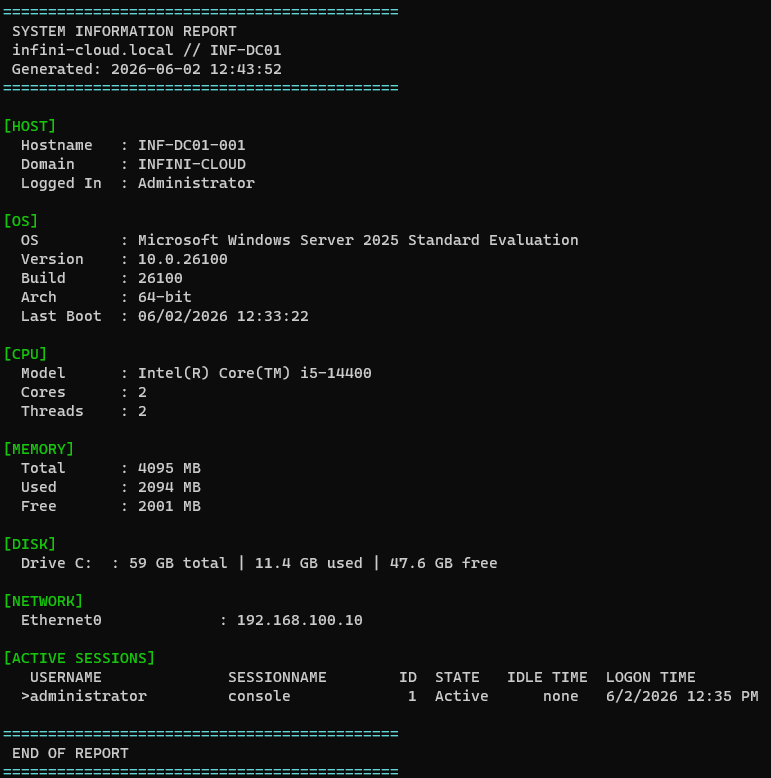
Collects hostname, domain, OS build, CPU, RAM, disk, network adapters, and active sessions. Output is plaintext — paste directly into ticket notes.
.\collect-system-info.ps1
# collect-system-info.ps1 — Run on INF-DC01 or any domain PC
# Hostname and domain context
Write-Host " Hostname : $env:COMPUTERNAME"
Write-Host " Domain : $env:USERDOMAIN"
# OS info via CIM (replaces deprecated WMI)
$os = Get-CimInstance -ClassName Win32_OperatingSystem
Write-Host " OS : $($os.Caption)"
Write-Host " Build : $($os.BuildNumber)"
# Memory — convert KB to MB
$totalMB = [math]::Round($os.TotalVisibleMemorySize / 1KB)
Write-Host " RAM : $totalMB MB total"
# Fixed disks only (DriveType 3)
Get-CimInstance Win32_LogicalDisk -Filter "DriveType=3" | ForEach-Object {
$gb = [math]::Round($_.Size/1GB, 1)
Write-Host " Drive $($_.DeviceID) : $gb GB"
}
# Active user sessions
query user
# Hostname and domain context
Write-Host " Hostname : $env:COMPUTERNAME"
Write-Host " Domain : $env:USERDOMAIN"
# OS info via CIM (replaces deprecated WMI)
$os = Get-CimInstance -ClassName Win32_OperatingSystem
Write-Host " OS : $($os.Caption)"
Write-Host " Build : $($os.BuildNumber)"
# Memory — convert KB to MB
$totalMB = [math]::Round($os.TotalVisibleMemorySize / 1KB)
Write-Host " RAM : $totalMB MB total"
# Fixed disks only (DriveType 3)
Get-CimInstance Win32_LogicalDisk -Filter "DriveType=3" | ForEach-Object {
$gb = [math]::Round($_.Size/1GB, 1)
Write-Host " Drive $($_.DeviceID) : $gb GB"
}
# Active user sessions
query user
📷 system-info-output.png — Full script output on INF-DC01: Windows Server 2025, i5-14400, 4095 MB RAM, 59 GB disk, active session
PowerShell-Username <sam>Requires AD Module
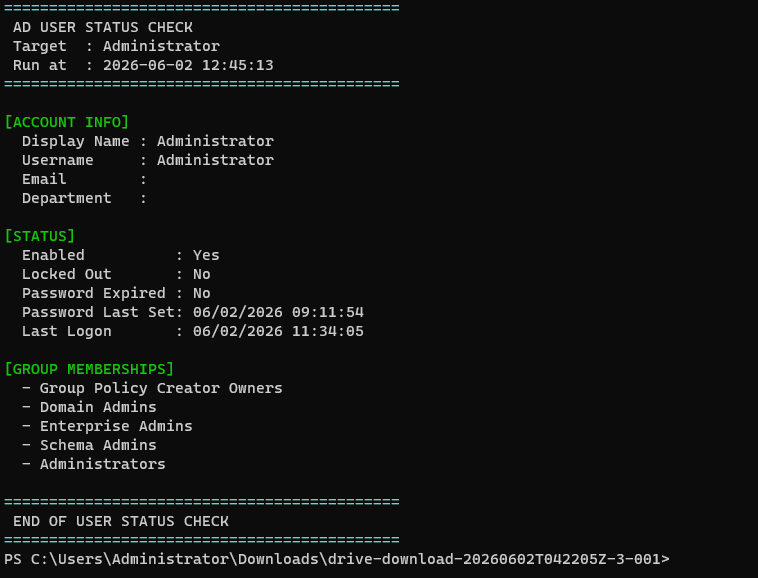
Queries AD for user existence, lock status, password expiry, last logon, and group memberships. Requires RSAT AD module installed on INF-DC01.
.\check-user-status.ps1 -Username Administrator
# check-user-status.ps1 -Username <SAMAccountName>
# Requires: ActiveDirectory module (RSAT on INF-DC01)
param([Parameter(Mandatory)][string]$Username)
Import-Module ActiveDirectory
# Retrieve user with all relevant properties
$user = Get-ADUser -Identity $Username -Properties `
LockedOut, Enabled, PasswordExpired,
PasswordLastSet, LastLogonDate, MemberOf
# Account status
Write-Host " Locked Out : $($user.LockedOut)"
Write-Host " Enabled : $($user.Enabled)"
Write-Host " Password Expired : $($user.PasswordExpired)"
Write-Host " Last Logon : $($user.LastLogonDate)"
# Group memberships — extract CN from distinguished name
$user.MemberOf | ForEach-Object {
$cn = ($_ -split ',')[0] -replace '^CN=',''
Write-Host " - $cn"
}
# Requires: ActiveDirectory module (RSAT on INF-DC01)
param([Parameter(Mandatory)][string]$Username)
Import-Module ActiveDirectory
# Retrieve user with all relevant properties
$user = Get-ADUser -Identity $Username -Properties `
LockedOut, Enabled, PasswordExpired,
PasswordLastSet, LastLogonDate, MemberOf
# Account status
Write-Host " Locked Out : $($user.LockedOut)"
Write-Host " Enabled : $($user.Enabled)"
Write-Host " Password Expired : $($user.PasswordExpired)"
Write-Host " Last Logon : $($user.LastLogonDate)"
# Group memberships — extract CN from distinguished name
$user.MemberOf | ForEach-Object {
$cn = ($_ -split ',')[0] -replace '^CN=',''
Write-Host " - $cn"
}
📷 check-user-status-output.png — AD USER STATUS CHECK: account info, Enabled/Locked/Expired status, and group memberships
PowerShell-Services (optional)Read-only
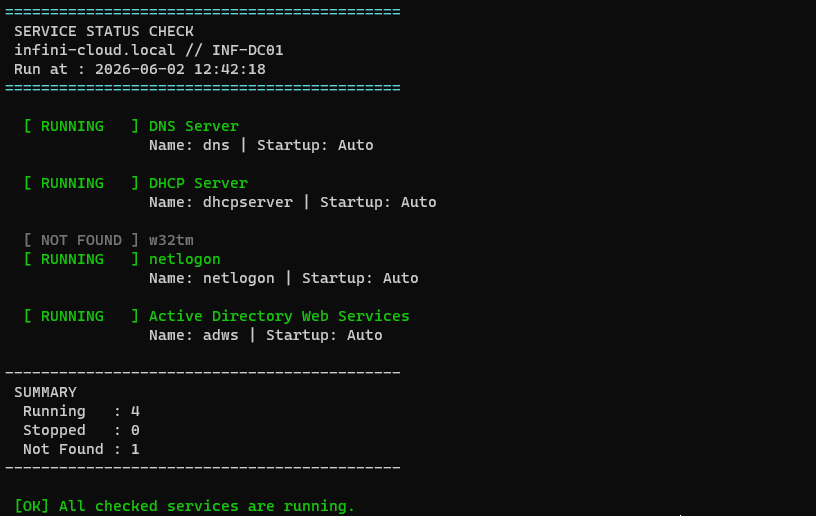
Checks Windows service status on INF-DC01. Defaults to DNS, DHCP, Netlogon, W32tm, ADWS — critical services for domain operations. Exit code 1 if any service is stopped.
.\service-check.ps1 -Services "dns","netlogon","w32tm"
# service-check.ps1 [-Services "dns","dhcpserver","netlogon"]
# Default: checks DNS, DHCP, W32tm, Netlogon, ADWS
param([string[]]$Services = @("dns","dhcpserver","w32tm","netlogon","adws"))
foreach ($svcName in $Services) {
$svc = Get-Service -Name $svcName -ErrorAction SilentlyContinue
if ($null -eq $svc) {
Write-Host " [ NOT FOUND ] $svcName"
continue
}
switch ($svc.Status) {
'Running' { Write-Host " [ RUNNING ] $($svc.DisplayName)" }
'Stopped' { Write-Host " [ STOPPED ] $($svc.DisplayName)" }
default { Write-Host " [ UNKNOWN ] $($svc.DisplayName)" }
}
}
# Default: checks DNS, DHCP, W32tm, Netlogon, ADWS
param([string[]]$Services = @("dns","dhcpserver","w32tm","netlogon","adws"))
foreach ($svcName in $Services) {
$svc = Get-Service -Name $svcName -ErrorAction SilentlyContinue
if ($null -eq $svc) {
Write-Host " [ NOT FOUND ] $svcName"
continue
}
switch ($svc.Status) {
'Running' { Write-Host " [ RUNNING ] $($svc.DisplayName)" }
'Stopped' { Write-Host " [ STOPPED ] $($svc.DisplayName)" }
default { Write-Host " [ UNKNOWN ] $($svc.DisplayName)" }
}
}
📷 service-check-output.png — SERVICE STATUS CHECK: DNS, DHCP, Netlogon, ADWS running — w32tm not found — summary: 4 running, 1 not found
PowerShell-Username <sam>Writes .zip file
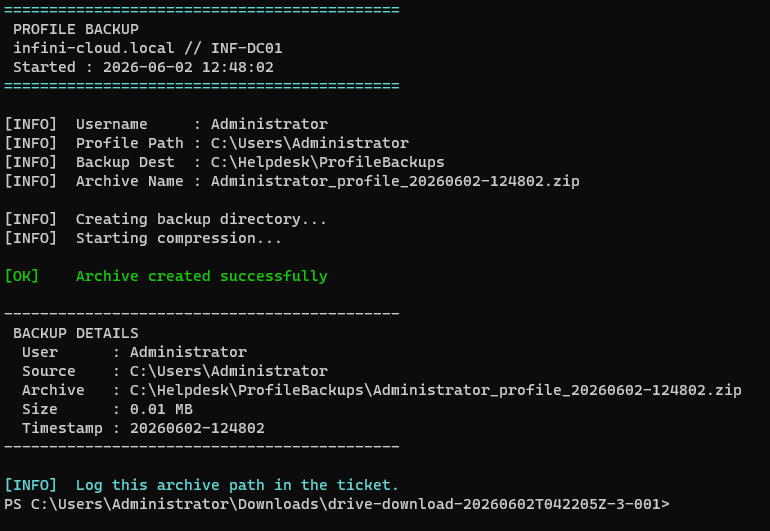
Archives a user's Windows profile folder (C:\Users\username) to a timestamped .zip file. Use before offboarding, reimaging, or profile migration. Default destination: C:\Helpdesk\ProfileBackups\.
.\backup-profile.ps1 -Username Administrator
# backup-profile.ps1 -Username <sam> [-BackupRoot <path>]
# Archives C:\Users\<username> to a .zip with timestamp
param(
[Parameter(Mandatory)][string]$Username,
[string]$BackupRoot = "C:\Helpdesk\ProfileBackups"
)
$Timestamp = Get-Date -Format "yyyyMMdd-HHmmss"
$Archive = "${Username}_profile_${Timestamp}.zip"
$ProfilePath = "C:\Users\$Username"
# Verify profile exists before attempting backup
if (-not (Test-Path $ProfilePath)) {
Write-Host "[ERROR] Profile not found: $ProfilePath"
exit 1
}
# Compress-Archive is built into PowerShell 5.1
Compress-Archive -Path $ProfilePath `
-DestinationPath "$BackupRoot\$Archive" -Force
Write-Host "[OK] Archive: $BackupRoot\$Archive"
# Archives C:\Users\<username> to a .zip with timestamp
param(
[Parameter(Mandatory)][string]$Username,
[string]$BackupRoot = "C:\Helpdesk\ProfileBackups"
)
$Timestamp = Get-Date -Format "yyyyMMdd-HHmmss"
$Archive = "${Username}_profile_${Timestamp}.zip"
$ProfilePath = "C:\Users\$Username"
# Verify profile exists before attempting backup
if (-not (Test-Path $ProfilePath)) {
Write-Host "[ERROR] Profile not found: $ProfilePath"
exit 1
}
# Compress-Archive is built into PowerShell 5.1
Compress-Archive -Path $ProfilePath `
-DestinationPath "$BackupRoot\$Archive" -Force
Write-Host "[OK] Archive: $BackupRoot\$Archive"
📷 backup-profile-output.png — PROFILE BACKUP output: archive created at C:\Helpdesk\ProfileBackups\, 0.01 MB, timestamp 20260602-124802
[ Helpdesk SOP ]
Standard operating procedures — infini-cloud L1/L2
[ SOP-01 ] NEW TICKET
1.
Acknowledge within SLA response time
2.
Read full description before acting or calling
3.
Check ticket history — same issue submitted before?
4.
Assign correct priority based on user impact
[ SOP-02 ] IDENTITY VERIFICATION
Required before any account change — no exceptions.
1.
Confirm full name
2.
Confirm department
3.
Confirm manager's name
!
Do not proceed if all three cannot be confirmed
[ SOP-03 ] ACCOUNT UNLOCK
1.
Verify identity per SOP-02
2.
ADUC → Account tab → confirm locked
3.
Tick Unlock account → Apply
4.
User confirms login — monitor for re-lock
!
Re-locks within 1 hour → escalate to L2
[ SOP-04 ] PASSWORD RESET
1.
Verify identity per SOP-02
2.
Right-click user → Reset Password
3.
Temp password: 10+ chars, mixed complexity
4.
Check "must change at next logon"
5.
Deliver via phone only — never email or ticket body
[ SLA REFERENCE ]
| Priority | Response | Resolution | Example |
|---|---|---|---|
| Critical | 15 min | 1 hour | All users cannot log in |
| High | 30 min | 4 hours | User fully blocked from working |
| Medium | 2 hours | 8 hours | Account lockout, access issue |
| Low | Next day | 3 days | Non-urgent access request |
[ Troubleshooting Cheatsheet ]
PowerShell — Windows Server 2025 — Windows 11 Pro
[ AD QUERIES — INF-DC01 ]
# Check user — lock, expiry, last logon
Get-ADUser -Identity johns `
-Properties LockedOut, PasswordExpired, LastLogonDate
# Unlock account
Unlock-ADAccount -Identity johns
# Find all locked accounts
Search-ADAccount -LockedOut | Select Name, SamAccountName
# Add user to group
Add-ADGroupMember -Identity "SG-HR-SharedFolder" -Members carlosr
# Check group members
Get-ADGroupMember "SG-HR-SharedFolder" | Select Name
Get-ADUser -Identity johns `
-Properties LockedOut, PasswordExpired, LastLogonDate
# Unlock account
Unlock-ADAccount -Identity johns
# Find all locked accounts
Search-ADAccount -LockedOut | Select Name, SamAccountName
# Add user to group
Add-ADGroupMember -Identity "SG-HR-SharedFolder" -Members carlosr
# Check group members
Get-ADGroupMember "SG-HR-SharedFolder" | Select Name
[ SYSTEM & NETWORK — WIN SERVER 2025 ]
# Test DC connectivity
Test-Connection INF-DC01 -Count 2
Resolve-DnsName infini-cloud.local
# Confirm domain membership
(Get-WmiObject Win32_ComputerSystem).Domain
# Network adapters
Get-NetIPAddress -AddressFamily IPv4
# Flush DNS cache
Clear-DnsClientCache
# Disk space
Get-PSDrive -PSProvider FileSystem
# Force Group Policy refresh (L1 safe)
gpupdate /force
Test-Connection INF-DC01 -Count 2
Resolve-DnsName infini-cloud.local
# Confirm domain membership
(Get-WmiObject Win32_ComputerSystem).Domain
# Network adapters
Get-NetIPAddress -AddressFamily IPv4
# Flush DNS cache
Clear-DnsClientCache
# Disk space
Get-PSDrive -PSProvider FileSystem
# Force Group Policy refresh (L1 safe)
gpupdate /force
[ WINDOWS EVENT IDs — ACCOUNT RELATED ]
| Event ID | Meaning | Where |
|---|---|---|
| 4740 | Account locked out | Security log — INF-DC01 |
| 4625 | Failed login attempt | Security log — Workstation |
| 4624 | Successful login | Security log |
| 4722 | Account enabled | Security log — DC |
| 4723 | Password change attempt | Security log |
| 4726 | Account deleted | Security log — DC |
[ COMMON ERRORS & FIXES ]
| Error | Cause | Fix |
|---|---|---|
| Account locked out | Failed attempt threshold | Unlock-ADAccount or ADUC Account tab |
| Password incorrect | Wrong password / caps lock | Set-ADAccountPassword or ADUC reset |
| No logon servers available | DNS / DC unreachable | Test-Connection INF-DC01; fix DNS |
| Access denied (share) | Missing group membership | Add-ADGroupMember |
| Network path not found | Drive mapping / DC offline | Get-PSDrive; verify DC |
| GPO not applying | Policy not refreshed | gpupdate /force (L1 safe) |